
🎁 Configuring and Using Loyalty Programs in MaltiTask POS
In the retail world, customer loyalty is everything. Rewarding your repeat customers not only keeps them coming back but also helps boost sales, engagement, and brand trust.
With MaltiTask Point of Sale (POS), building a powerful loyalty program is easier than ever. You can configure flexible loyalty points, discounts, and rewards directly inside the POS system—no extra integration needed.
In this blog, we’ll explore how to set up and manage loyalty programs in MaltiTask POS step by step.
💡 Why Use Loyalty Programs?
Before we dive into the setup, here’s why loyalty systems matter:
- 🧍♂️ Improves customer retention
- 💰 Encourages repeat purchases
- 📊 Provides useful customer purchase data
- 💡 Enhances customer satisfaction
If you’re running a retail store or cafe, a loyalty system helps you stay competitive while adding value to the customer experience.
🧰 How to Enable Loyalty Programs in MaltiTask
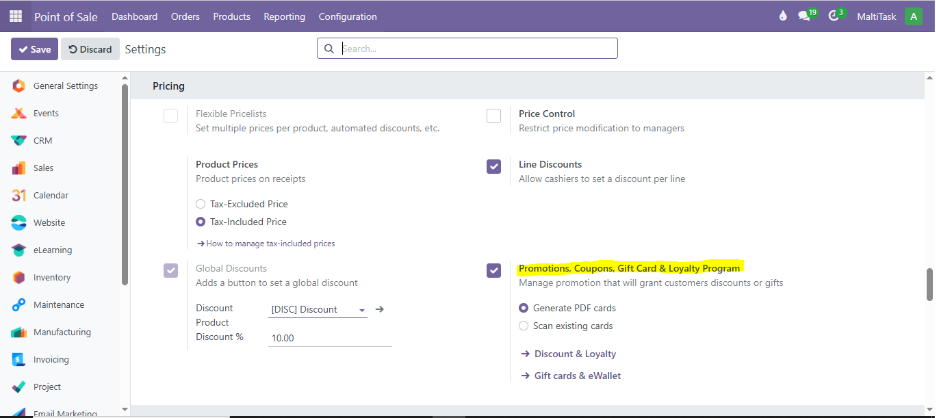
To start using loyalty rewards, first make sure the feature is enabled.
📌 Path to Enable Loyalty:
Point of Sale > Configuration > Settings
Scroll down to the Pricing section and enable Loyalty Program.
🏗️ Creating a New Loyalty Program
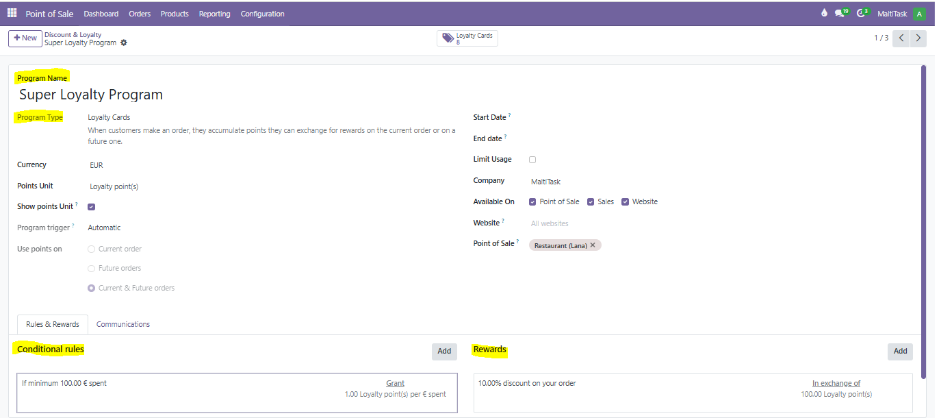
Now let’s create a program that defines how points are earned and redeemed.
📌 Menu Path:
Point of Sale > Products > Loyalty Programs > New
Key Fields to Configure:
- Program Name – Give it a name like “Super Loyalty Program”
- Points per Currency – e.g., 1 point for every per € spent
- Points per Product – Assign bonus points for specific items
- Points per Order – Extra points for high-value orders
- Reward Lines – Define rewards like discounts or free products
🎯 Setting Loyalty Rules and Rewards
After creating the base program, configure Reward Lines and Rules:
Common Reward Types:
- 💸 Discount – e.g., 10% off on next purchase
- 🎁 Gift Product – Free product after earning X points
- 🔁 Resale Coupons – Coupons redeemable in next visit
📌 Add Reward: In the program form, go to the Rewards tab > Add a line
🔗 Linking Loyalty Program to POS
Once the loyalty program is created, you need to link it to your POS.
📌 Menu Path:
Point of Sale > Configuration > Point of Sale > Select POS > Pricing Tab > Choose Loyalty Program
🛒 Using Loyalty in Live POS Session
Now, let’s test it in a real POS session.
📌 Menu Path:
Point of Sale > Dashboard > Open POS Session
When a customer makes a purchase:
Their earned points are shown on the receipt
If they qualify, the reward can be redeemed immediately or in the next session

🌟 How Maltitask Can Help
At Maltitask, we specialize in POS implementations tailored for retail businesses. Whether you’re launching your first store or managing a franchise, our team can:
✅ Set up Loyalty Programs
✅ Customize POS for your products
✅ Train staff to use rewards effectively
✅ Integrate CRM and Sales with POS
📞 Get in touch and let us help you turn first-time buyers into loyal customers.
🧠 Conclusion
With just a few configurations, MaltiTask’s POS Loyalty Program can help you increase sales, encourage customer return visits, and stand out from competitors. It’s flexible, easy to use, and can be customized to suit any type of business.
Start rewarding your customers the smart way—and watch your repeat sales grow.